BookWhip — Appointment Booking, Events & Payments
Everything a service business needs inside WordPress: online booking, events with QR tickets, gift cards, memberships, quotes and jobs, invoices and online payments.
Requirements
- WordPress 6.2 or newer, PHP 7.4 or newer (8.x recommended), MySQL 5.7+ / MariaDB 10.3+.
- Works with any theme. Elementor and WooCommerce are optional.
- WP-Cron should run (it does on almost every host) — it sends reminders and frees unpaid bookings.
Installation
- In WordPress go to Plugins → Add New → Upload Plugin and choose
bookwhip.zipfrom your download. - Click Install Now, then Activate.
- The Welcome to BookWhip screen opens. BookWhip also creates four pages for your customers: Book an Appointment, Your Quote, Your Invoice and My Bookings.

Quick start (5 minutes)
- Pick a business template on the Welcome screen (or add services yourself under BookWhip → Services).
- Open BookWhip → Staff, add the people customers book, tick their services and set their weekly hours.
- Check BookWhip → Settings: currency, how far ahead people may book, minimum notice and payments.
- Visit the Book an Appointment page — your booking form is live. Add it to your menu.
Business templates
One click adds typical services with prices, durations and deposits for: Clinic & health, Salon & spa, Consultant & coach, Tutor & lessons, Fitness & yoga, Home services. Nothing is ever deleted and running a template twice does not create duplicates. If you have no staff yet, you are added as the first staff member with Monday–Friday hours.
Services
BookWhip → Services → Add service.
| Field | What it does |
|---|---|
| Duration / Price | Default length and price. Each staff member can have their own price and duration. |
| How customers book | Instant – confirmed right away. On approval – you confirm each booking. Quote first – customers describe the job and you send a price. |
| Deposit | None, fixed amount or percent. Bookings with a deposit are held until it is paid (see Payments). |
| Buffer before / after | Free time kept before and after each appointment (cleanup, travel). |
| Seats per slot | More than 1 makes it a group class (several customers share the same time). |
| Online meeting | None, Zoom or Google Meet — a link is created when the booking is confirmed. |
| Price (EUR, GBP …) | Appears when you add extra currencies in Settings. |
Staff & working hours
BookWhip → Staff. For each person: weekly hours (switch a day on or off, add one or more breaks), the services they offer (with optional own price and duration), locations, color and an optional WordPress user so they can sign in and see My Schedule.

Days off & holidays
BookWhip → Days off. Choose Whole business for holidays or a person for vacations. Leave the hours empty for whole days. Nobody can book in these times.
Locations
Optional. Add branches with their own address and time zone, then link staff to them.
Customer pages
| Page | Shortcode | Purpose |
|---|---|---|
| Book an Appointment | [bookwhip_booking] | The booking form (and quote requests). |
| My Bookings | [bookwhip_portal] | Customer portal: bookings, quotes, invoices; reschedule and cancel. |
| Your Quote | [bookwhip_quote] | Opened from the private link in the quote email. |
| Your Invoice | [bookwhip_invoice] | Opened from the invoice email; shows the pay buttons. |
Bookings calendar
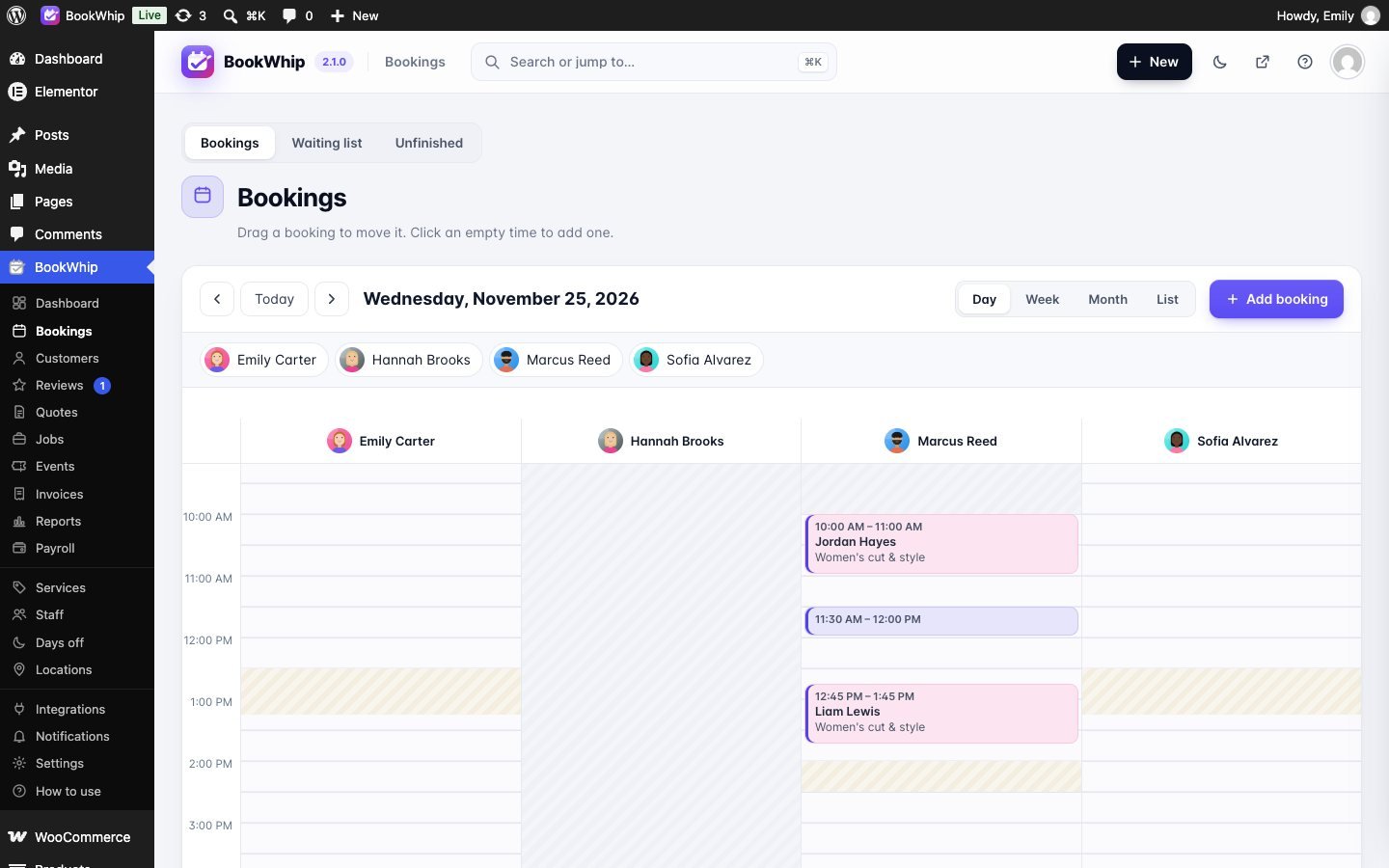
BookWhip → Bookings shows a week, month or list view. Scheduled jobs appear in teal. Click a booking to change its status (Confirmed, Done, No-show, Cancelled), move it to another time or see its payments. Add booking takes phone bookings — the time is checked against hours, breaks, days off and other bookings exactly like online.
Quotes
- A customer picks a Quote first service and describes the job (address, details, preferred date).
- You open BookWhip → Quotes, add lines, discount, tax %, deposit (amount or %), a message and an expiry date, then Save & send.
- The customer opens the private link and can accept, ask for changes or decline. Asking for changes lets you send a new version — every version is kept in the history.
- An accepted quote becomes a job, and a deposit invoice is created when the quote has a deposit.

Jobs & technicians
BookWhip → Jobs. Schedule a job, choose one or more technicians (each is checked for other bookings, jobs and time off) and move it through In progress → Completed. Completing a job creates the balance invoice (quote total minus what was already invoiced). The customer and each technician get an email with a calendar file.
Invoices
BookWhip → Invoices lists every invoice with billed, paid and outstanding totals. Record in-person payments on the job or booking screen. Paid amounts are always added up from the payment records, so totals cannot drift.
Dashboard
The Welcome screen shows today's and the next 7 days' appointments, this month's revenue compared to last month, outstanding invoices, new quote requests, upcoming jobs and a 30-day revenue chart.
Staff: My Schedule
Staff linked to a WordPress user (role BookWhip Staff) see only My Schedule: their own appointments and jobs for the next 14 days, with Start / Done / No-show buttons. They cannot see settings, other people's data or money.
Booking form
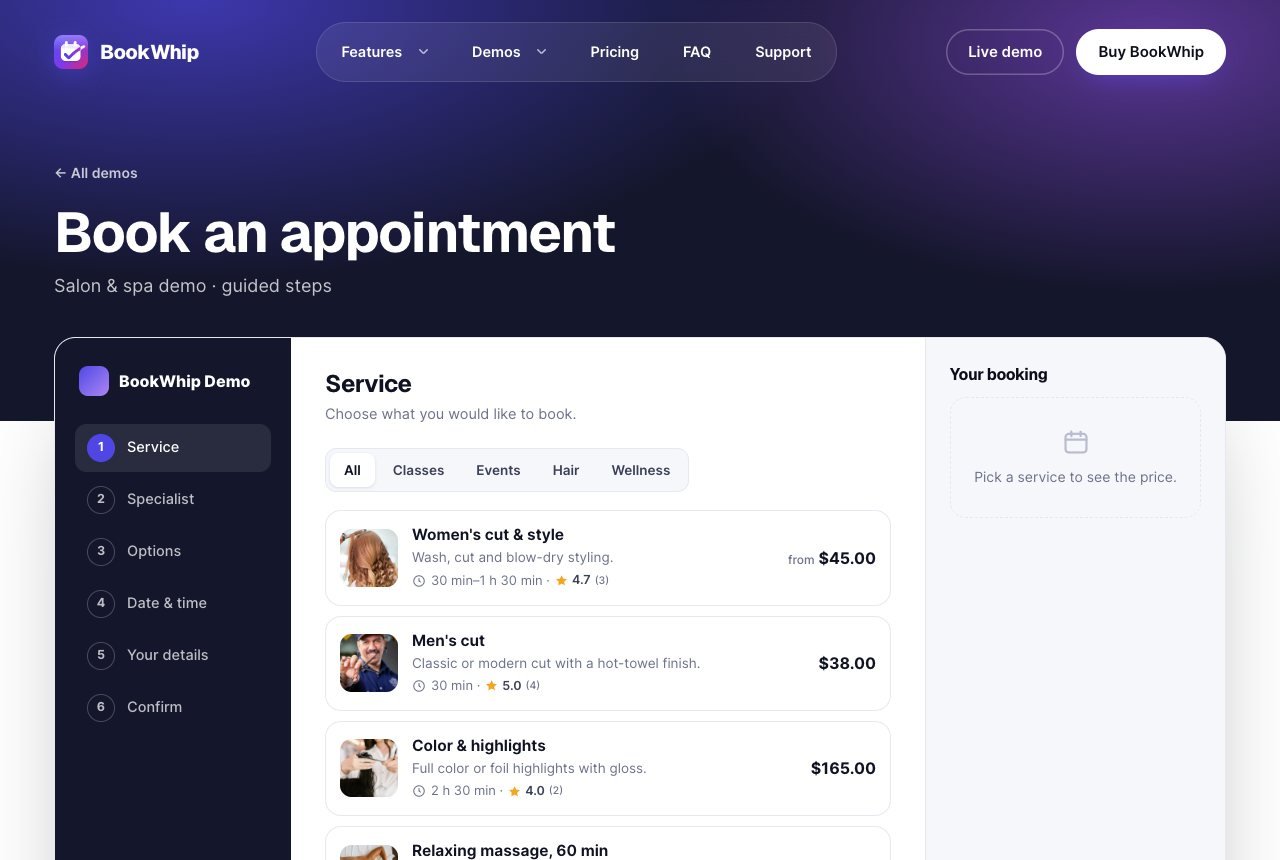
Customers pick a service → specialist (or Any available) → date and time → their details. Times are shown in your business time zone. Every time is checked again on the server when they confirm, and a per-staff lock makes double bookings impossible — even when two people click at the same moment.
Repeating visits
When Settings → Customers can book repeating visits is on, customers can choose every week, every 2 weeks or every month for 2–12 visits. Each visit is checked; dates that are not free (for example a holiday) are skipped and shown to the customer. The whole series shares one deposit invoice and is confirmed — or released — together.
Several services at once
On the details step customers can press Add another service (up to 6). All of them are booked in one order with one deposit. If one time was taken meanwhile, nothing is booked and the customer is told which one.
Customer portal
Every email contains a private Manage your booking link to My Bookings. Customers see upcoming and past bookings, quotes and invoices, and can reschedule (same specialist) or cancel up to the number of hours you allow (Notifications → rules, default 24 hours).
Customer accounts
Customers never need an account. If you like, turn on Settings → Offer an optional customer account: a checkbox appears on the booking form and creates a WordPress account with the BookWhip Customer role. These users can never open the WordPress dashboard — they are sent to their portal, and the admin bar is hidden for them.
Extra questions
Settings → Extra questions on the booking form. Add short text, long text, dropdown or checkbox questions and mark them as required. Answers appear on the booking and in your “New booking” email (placeholder {custom_fields}).
Payments & deposits
Turn methods on in Settings → Payments. A booking that needs a deposit shows Pay deposit right after booking and in the email; it is confirmed automatically when the deposit is paid. If it is not paid within the hold time (default 30 minutes) the booking is cancelled and the time freed. All keys are stored encrypted and never shown again.
Stripe
- In Stripe → Developers → API keys copy the Secret key.
- In Stripe → Developers → Webhooks add an endpoint with the URL shown in BookWhip Settings and the event
checkout.session.completed. Copy the Signing secret. - Paste both into Settings → Payments → Stripe and tick Stripe.
Every webhook is signature-checked and duplicate events are ignored.
PayPal
Create a REST app at developer.paypal.com, copy its Client ID and Secret into Settings, and untick Sandbox when you go live. Payments are captured on your server after the customer approves them.
WooCommerce
Tick WooCommerce checkout to use any gateway you already set up in WooCommerce. BookWhip creates an order for the amount due; when the order is processing or completed the payment is recorded once.
Several currencies
Add extra currencies in Settings, then give services a price in each one. Customers switch the currency on the booking form; only services priced in that currency are shown, and the booking, invoice and payment use it. There are no live exchange rates — you set each price.
Emails, SMS & WhatsApp
BookWhip → Notifications. Thirteen messages — booking received / confirmed / moved / cancelled, 24-hour reminder, quote sent and answered, job scheduled (customer and technicians), invoice and receipt. Edit subject and text, choose email, SMS and/or WhatsApp per message, and set your business name and email color. Confirmations include a calendar (.ics) file.
Placeholders: {first_name} {customer_name} {service} {staff} {date} {time} {booking_number} {amount} {portal_link} {quote_link} {invoice_link} {address} {business_name} {custom_fields}.
SMS / WhatsApp use your own Twilio account: paste the Account SID, Auth token and sender numbers.
Google Calendar & Google Meet
- In Google Cloud create an OAuth client (type Web application) and enable the Google Calendar API.
- Add the redirect URI shown on BookWhip → Integrations.
- Paste the Client ID and secret, save, then press Connect Google Calendar for each staff member.
Confirmed bookings are added to that person's calendar, moved and cancelled bookings are updated, and their busy times in Google block those times in BookWhip. Services set to Google Meet get a Meet link.
Zoom
Create a Server-to-Server OAuth app in the Zoom App Marketplace (scope meeting:write) and paste the Account ID, Client ID and secret on the Integrations screen. Services set to Zoom get a meeting link when confirmed.
Elementor widgets
Search for BookWhip in the Elementor panel: Booking Form (with optional preselected service and specialist), Customer Portal, Quote View and Invoice & Payment. The form works inside the Elementor editor too.
Gutenberg blocks
In the block editor add BookWhip · Booking Form, Customer Portal, Quote View or Invoice & Payment. The Booking Form block can preselect a service and specialist in the sidebar.
Shortcodes
| Shortcode | Options |
|---|---|
[bookwhip_booking] | service="ID" starts with that service; staff="ID" preselects a person. Without a shortcode, link to the booking page with ?service=ID&staff=ID. The builder on BookWhip → How to use writes both for you. |
[bookwhip_portal] | — |
[bookwhip_quote] | — |
[bookwhip_invoice] | — |
What is new in 2.0
BookWhip 2.0 is a big update. Everything below is included — there are no paid add-ons.
A faster admin
- Search or jump (Ctrl/⌘ K): find any customer, booking, invoice, quote, event or screen from the top bar. Press
/anywhere to open it. - + New: add a booking, customer, service, event or staff member from any screen.
- Light / dark mode: the moon icon in the top bar; each user keeps their own choice.
- Calendar: day, week and month views with a column per person. Drag a booking to move it, click an empty time to add one, click a booking to confirm, complete, mark a no-show or cancel.
Booking form: three layouts
Settings → Booking form: Guided steps, One screen or Photo catalog, with your colours, corners, font and logo. Any page can use another layout: [bookwhip_booking layout="split"]. Services can have several lengths, add-ons, a price per person and special prices by weekday or time (Services → Add-ons / Special prices).
Packages, coupons and rooms
- Packages: sell “5 facials for $340”. After payment the customer gets a private link to book each visit; the sessions count down.
- Coupons: percent or amount, minimum order, limits per customer and in total, dates and services.
- Resources: rooms, chairs or equipment shared by the team. A time is only free when the resource is free too.
Events, tickets and check-in
Events → Add event: ticket types with their own price and seats, early-bird prices, repeating dates and a waiting list. Put [bookwhip_events] on a page. Customers get e-tickets with QR codes; open Events → Check-in on a phone and type or scan the code at the door.
Ratings & reviews
- A few hours after each visit (Settings → Reviews → When to ask) the customer gets a “How was your visit?” email with a 5-star rating page.
- Choose which ratings publish right away (for example 4 and 5 stars); others wait on the Reviews screen. You can publish, hide, delete and reply publicly.
- You get an email about low ratings, so you can make it right quickly.
- Star averages show next to services and team members on the booking form.
- Show reviews on any page:
[bookwhip_reviews limit="6" columns="3"](optionsservice,staff,min,summary="no"). It adds Google review-stars data automatically.
No-show rules and reasons
- Settings → No-shows: after a number of missed visits (no-shows, plus late cancellations if you want) a customer must pay in full when booking online; after more, online booking closes for them and they are asked to contact you. Older no-shows are forgiven after the period you choose.
- Per customer (Customers → open a customer → Online booking) you can override this: always allow, pay first, or no online booking.
- Optional missed-appointment fee (percent or fixed): marking a no-show creates an invoice for the fee minus anything already paid and emails it.
- Reasons: customers pick a reason when they cancel or move a booking (optional or required). You can add a reason and mark a cancellation as late from the booking screen or the calendar. Reasons appear in emails and in Reports.
Unfinished-booking reminders
When someone types their email on the booking form and leaves, they get one friendly reminder after the hours you choose, with a link that reopens the same service, person and day with their details filled in (optionally with a coupon). Bookings → Unfinished shows who left, who came back and the revenue recovered. Unfinished details are deleted after 30 days and are covered by WordPress’ Export / Erase Personal Data tools.
Reports
Reports shows revenue received, booked value, bookings, customers, cancellation and no-show rates for any period, compared with the period before; a revenue chart; busiest times by weekday and hour; each team member’s bookings, value and how busy they are; services; why bookings were lost; returning customers and top customers. Export bookings (CSV) downloads the period; Print gives a clean printout.
More payments and integrations
- Payments: Stripe, PayPal, Square, Mollie, Razorpay, WooCommerce and pay at the visit. Refunds go back through the same service from the invoice screen.
- Calendars: Google and Outlook / Microsoft 365 two-way sync, Google Meet, Zoom and Teams links, and private calendar feeds for Apple Calendar.
- Webhooks for Zapier / Make (signed with
X-BookWhip-Signature), Mailchimp sign-up, Google Analytics 4 and Meta Pixel events. - WPML and Polylang translation, right-to-left languages.
AI assistants (Claude, ChatGPT, Angie)
On WordPress 6.9 or newer BookWhip registers ten abilities: list services, find free times, list bookings, get a booking, find a customer, business summary, create, move and cancel a booking, and confirm / complete / no-show. They are available through the REST API (/wp-json/wp-abilities/v1) and, with the MCP Adapter plugin, to desktop AI tools. Integrations → AI assistants has an on/off switch and a ready-to-copy Claude Desktop configuration. Every ability needs a user who can manage BookWhip — create an application password for that user.
Export & import
Settings → Data → Export & import downloads one JSON file with all bookings, customers, services, invoices, events, reviews, settings, email texts and form questions. Import it on another site to move everything (the import replaces BookWhip data there and saves a backup first in wp-content/uploads/bookwhip-backups). API keys and passwords are never exported — enter them again after moving. Photos and page links are not copied.
White label
Settings → White label (administrators only): your own product name everywhere instead of “BookWhip”, a logo for the admin bar, an admin colour, the author name on the Plugins screen, and an option to hide help, support links and the version number.
What is new in 2.1
Eight more features, all included.
Gift cards
- Settings → Gift cards: turn them on, set the amounts (up to 8) and, if you like, let buyers type any amount between a minimum and a maximum. Choose how many months a card is valid (0 = no expiry).
- Put
[bookwhip_gift_cards]on a page (a “Gift Cards” page is created for you). The buyer pays, the recipient gets an email with a code likeGIFT-7KQ2-M9XDand your personal message. - Customers enter the code on the invoice page (“Have a gift card?”). Part of a card can be used; the rest stays on it. If a paid booking is cancelled, the amount goes back to the card.
- Sales → Gift cards lists every card with its balance and history.
PDF invoices and receipts
Every invoice has a Download PDF button for you and the customer. Settings → Invoices: business address, tax / VAT number, a note at the bottom (bank details, terms), your logo and US Letter or A4. Turn on Attach to emails to send the PDF with invoice, payment receipt and refund emails. Languages that need other letters (Arabic, Greek…) open a printable page instead.
Memberships
- Services → Memberships: create plans such as “Glow Club — $129 / month, 2 facials included, 10% off everything else”. Monthly or yearly.
- Put
[bookwhip_memberships]on a page. When a member books with the same email, included visits are free until they are used up, then the plan discount applies. - With Stripe, plans renew by themselves (turn on Automatic renewal and add the
invoice.paidandcustomer.subscription.deletedevents to your Stripe webhook). With other payments BookWhip emails a renewal invoice a few days before the end. - Members can cancel from their customer page; benefits last until the paid period ends. Sales → Members shows everyone, their visits left and the end date.
Four more payment services
Paystack, Flutterwave, Mercado Pago and Authorize.net (Accept Hosted), next to Stripe, PayPal, Square, Mollie, Razorpay and WooCommerce. Add your keys in Settings → Payments; each row shows the webhook address to paste in that service. Refunds go back through the same service.
Staff app for phones
Your team opens yoursite.com/bookwhip-app/ on a phone and taps “Add to Home Screen”. They sign in once and see today’s and upcoming bookings, can confirm, complete or mark a no-show, add notes, ask for time off and see their earnings. Turn on notifications to get a push message for new, moved and cancelled bookings (needs HTTPS). Settings → Staff app sets the app name; the icon is your Site Icon.
Staff commission & payroll
- Staff → edit a person → Pay & commission: a percentage or fixed amount per completed booking (with optional per-service rates and a share of add-ons), plus an hourly, daily or fixed base pay.
- Payroll: create a pay run for the dates you want (form on the right); BookWhip adds up completed bookings for each person. Add bonuses or deductions, finalise, then mark each person paid. A booking is never paid twice.
- Email payslips, print them or download a CSV for your accountant. Staff see their earnings in the staff app.
Import from Bookly, Amelia and LatePoint
Settings → Data → Switching to BookWhip? Bring your data with you. BookWhip finds Bookly, Amelia or LatePoint data in the database (the plugin can even be deactivated) and copies services, staff with working hours and days off, customers, bookings and payments. Nothing in the other plugin is changed and nobody is emailed. Running it again only adds what is new.
Spanish, French, German and Arabic
BookWhip comes fully translated into Spanish, French, German and Arabic (right to left). Set the site language in Settings → General; the booking form, emails, customer pages and admin follow it. Other languages: translate languages/bookwhip.pot with Loco Translate or Poedit.
Settings reference
| Setting | Default |
|---|---|
| Time step | 15 minutes — how often a start time is offered |
| Minimum notice | 60 minutes before the start |
| Book up to | 90 days ahead |
| Repeating visits | On |
| Optional customer account | Off |
| Hold unpaid bookings | 30 minutes |
| Reschedule / cancel online | On, up to 24 hours before |
| Delete data when the plugin is deleted | Off (your data is kept) |
Spam protection
The booking, quote request, waiting list, ticket, gift card and membership forms are protected out of the box: a hidden field that only robots fill in, a minimum time to fill in a form and a limit per connection. Real customers never see any of it.
For extra protection turn on Cloudflare Turnstile (free): create a Turnstile widget in your Cloudflare dashboard, then paste its Site key and Secret key in Settings → Spam protection. Most visitors see nothing; a quick check appears only when a visit looks automated.
On a phone, the Bookings calendar shows one team member at a time in the day view — tap a name above the calendar to switch.
Roles & security
- Administrators get the
bookwhip_managecapability. - BookWhip Staff see only My Schedule. BookWhip Customer never reaches wp-admin.
- Prices, deposits and availability are always calculated on the server; private links use long random tokens; forms use nonces; bookings from one connection are rate-limited.
Privacy & GDPR
BookWhip adds an exporter and an eraser to Tools → Export / Erase Personal Data. Erasing removes the customer's personal details while keeping booking, invoice and payment records (without the person) for your accounts. A suggested text is added to Settings → Privacy.
For developers
Actions: bookwhip_booking_created, bookwhip_booking_confirmed, bookwhip_booking_cancelled, bookwhip_booking_rescheduled, bookwhip_quote_requested, bookwhip_quote_sent, bookwhip_quote_accepted, bookwhip_job_created, bookwhip_job_scheduled, bookwhip_invoice_created, bookwhip_payment_recorded, bookwhip_notification_sent. Filter: bookwhip_external_busy (block times from any external calendar). REST namespace: bookwhip/v1. All tables use the prefix {wp_prefix}bookwhip_.
FAQ
Do customers need an account?
No. They book as guests and manage everything from the private link in their email.
Can two people book the same time?
No. The server re-checks every time inside a per-staff lock.
Is Elementor or WooCommerce required?
No — both are optional.
Emails do not arrive.
Install an SMTP plugin (for example WP Mail SMTP) so your site sends mail reliably.
Can an AI assistant book for me?
Yes, on WordPress 6.9+ — see AI assistants.
Can I move BookWhip to a new site?
Yes — Settings → Data → Export & import.
Can I translate BookWhip?
Yes. The languages/bookwhip.pot file works with Loco Translate or Poedit. RTL languages are supported.
Changelog
2.1.0 — November 2026
- Gift cards: sell, email, partial use, refunds back to the card
- PDF invoices and receipts, attached to emails
- Memberships with included visits and discounts; Stripe automatic renewal
- Paystack, Flutterwave, Mercado Pago and Authorize.net
- Staff app for phones with push notifications
- Staff commission and payroll with payslips and CSV
- Import from Bookly, Amelia and LatePoint
- Spanish, French, German and Arabic (RTL) translations
- New app icon; WordPress notices drawer fix; cash-on-delivery orders count as paid only when completed
- Spam protection for public forms (honeypot, minimum time, optional Cloudflare Turnstile)
- Phone-friendly day view in the Bookings calendar; plain permalinks supported

2.0.0 — November 2026
- New admin: search & jump (Ctrl/⌘ K), + New menu, light/dark mode, drag-and-drop calendar
- Booking form layouts: guided steps, one screen, photo catalog; design settings
- Lengths, add-ons, price per person, special prices, packages, coupons, shared resources
- Events with ticket types, QR e-tickets, check-in and waiting list
- Ratings & reviews with automatic emails, moderation, replies and a reviews shortcode
- No-show rules (pay first / online booking closed), missed-appointment fee, cancel and move reasons
- Unfinished-booking reminders with resume link and recovered-revenue stats
- Reports with period comparison, busiest times, team utilisation and CSV export
- Square, Mollie, Razorpay; refunds; Outlook/Teams; calendar feeds; webhooks; Mailchimp; GA4 / Meta Pixel
- AI assistants via the WordPress Abilities API and MCP
- Full export & import, white label, WPML / Polylang, RTL

1.0.0 — November 2026
- First release
Support
Questions or a problem? Open a ticket at fekbd.com/support. Please include your WordPress and PHP versions and what you tried. Support covers help with the plugin's features and bug fixes.